Popup Builder - High‑Converting Website Popups for Leads & Sales

Create targeted, behavior‑based website popups that capture leads, reduce drop‑offs, and boost conversions - without any coding. Campaign Builder helps ecommerce stores, agencies, and in‑house marketers build smart popups that work across devices.

No credit card required 14-day free trial Setup in 5 mins.

HTML5

What Are Website Popups?

Website popups are on‑site messages that appear based on visitor behavior - such as exit intent, time on page, scroll depth, or click actions. Popups can collect email leads, promote offers, reduce cart abandonment, and drive engagement across your funnel.

For many ecommerce stores, strategic popups are a core part of customer acquisition - capturing leads before visitors leave. Agencies use popups to increase performance for client sites, and in‑house teams integrate popups into broader campaign strategies.
Mockup

Lightning-Fast Load

Our featherlight script makes popups load instantly - no lag, no drop-offs, just higher conversions.
Mockup

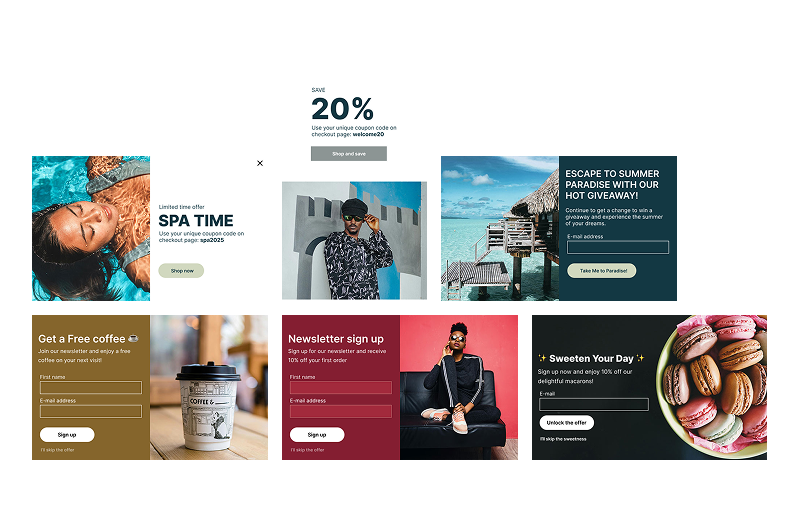
100+ Ready-Made Templates

Choose from 100+ customizable, proven-to-convert templates to launch stunning campaigns in minutes.
Mockup

Smart Targeting Rules

Reach the right visitor at the right moment with behavior triggers, page targeting, and personalization.
Mockup

Seamless Integrations

Sync popups directly with Shopify, Mailchimp, and Klaviyo to grow, convert, and track effortlessly.

Get started with popups

Follow these five steps to create, launch, and optimize popups that capture attention and drive conversions.

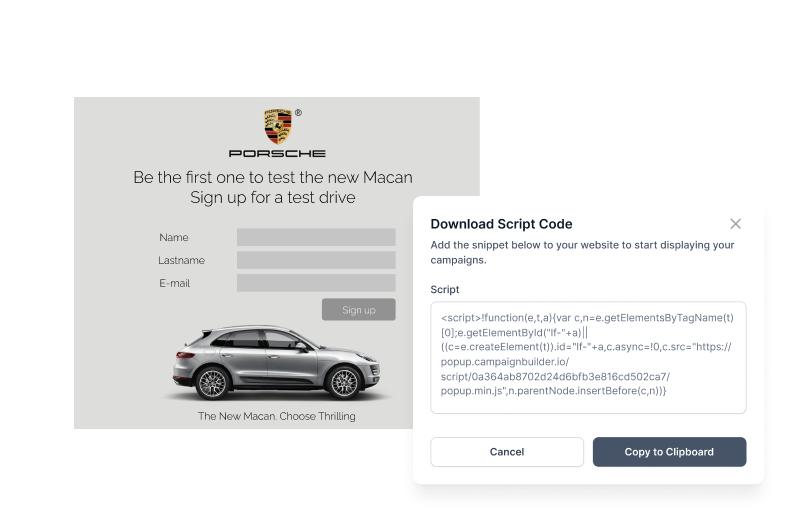
01.

Choose your popup goal

Select what you want to achieve - capture emails, promote offers, or drive specific actions on your site.

02.

Design your popup

Create visually engaging popups with drag-and-drop tools that match your brand and messaging.

03.

Add content and incentives

Include text, images, forms, or offers like discounts and signups to encourage user action.

04.

Set targeting and triggers

Control when and where your popups appear based on behavior, pages, or audience segments.

05.

Launch and optimize

Go live in seconds and continuously improve performance with insights and testing.

Everything you need to create high-converting popups

From design to targeting and automation-build, launch, and optimize popups that engage visitors and drive results.

Drag-and-drop builder

Design popups with an intuitive editor - no coding required.

Smart targeting & triggers

Show the right message at the right time with triggers like exit intent, scroll, or time on site.

Multi-step popups

Guide users through flows like signups or promotions with step-by-step popup experiences.

Templates for every use case

Start fast with ready-made templates for lead capture, discounts, announcements, and more.

Campaign scheduling

Plan when your popups go live with start and end dates for time-sensitive campaigns.

Seamless integrations

Connect popups with your tools, workflows, and campaigns to automate follow-ups and data collection.

On-brand design control

Ensure every popup matches your brand with full control over fonts, colors, and layout-no compromises.

Fast-loading

Deliver high-impact messages without slowing down your site or disrupting the user experience.

Frequently asked questions

Everything you need to know about the Popups
Do popups work on mobile devices?
Yes - Campaign Builder supports mobile‑optimized popups so your messages look great everywhere.
Can I target popups to specific pages?
Absolutely - show popups only on selected URLs or segments.
How do popups integrate with email/SMS marketing?
Popups can be connected to your email list, CRM, or SMS workflows to trigger follow‑ups automatically.
Can popups show only once per user?
Yes - configure display frequency to avoid annoying repeat visitors.
Create More Popups. In Less Time

Ready to Boost Leads & Conversions With Popups?

Start capturing more leads and conversions - without developers. Build your first popup in minutes.